Head to head
Total Excel Converter batches workbooks by GUI or command line using its own parser, so it needs no Excel. CrazySmartPDF drives your installed Excel and re-lays-out each sheet. Where each one wins.
Short answer: Total Excel Converter and CrazySmartPDF both batch a folder of workbooks into PDFs, and they take opposite routes to get there. Total Excel Converter reads the spreadsheet with its own parser, which means it needs no Microsoft Excel at all and runs happily on a server or from a scheduled command line. CrazySmartPDF drives your installed Excel for fidelity and then re-lays-out each sheet, so rows stay whole and wide tables stay readable. If the machine has no Excel, CoolUtils wins and there is nothing to argue about. If it does, the layout pass is the difference you can see on the page.
Total Excel Converter is a self-contained converter. Its own engine reads the .xls or .xlsx and draws the PDF, which is what makes it independent of Office — genuinely useful on a headless server, and the reason it turns up under command-line queries. The trade is that its output is its interpretation of your workbook rather than Excel’s. Fonts, number formats, conditional formatting and pivot layouts can land slightly differently from what you see on screen.
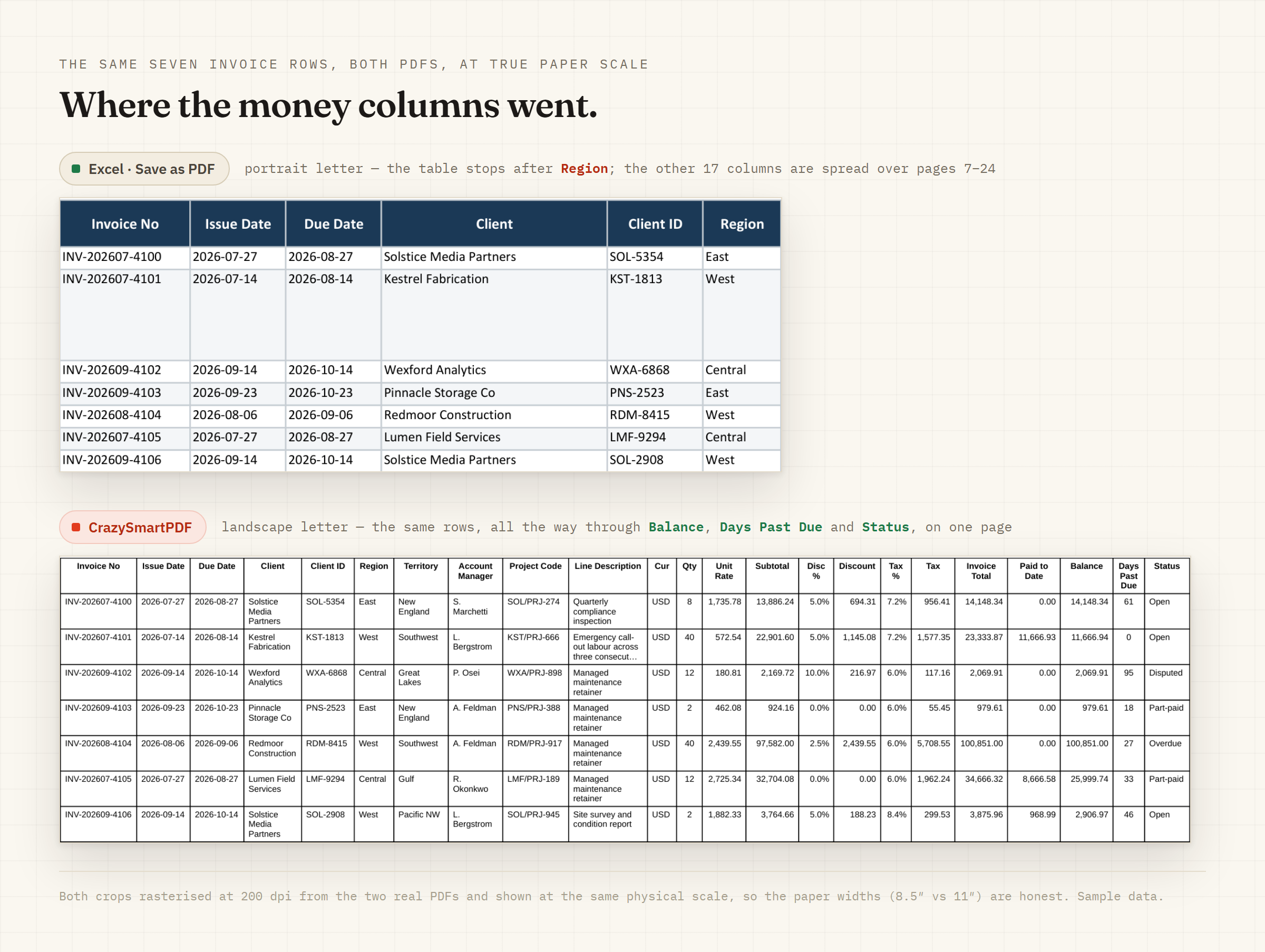
CrazySmartPDF goes the other way. Cover and pivot sheets export through your installed Excel, carrying the workbook’s real styling — logo, borders, number formats, colours — while the engine re-lays-out the data sheets: no row split across a page break, and a table too wide for the paper resized to a readable floor or sliced across pages with the label column repeated, instead of crushed or cut off. That fidelity is exactly why it needs Excel on the machine, which is also its hard limit.
| Total Excel Converter | CrazySmartPDF | |
|---|---|---|
| Needs Excel installed | No — own parser | Yes: Windows + Excel 2016+ (native apps) |
| Runs on a headless server | Yes | No |
| Layout | Renders the sheet as its parser reads it | Re-computes: rows whole, wide tables kept readable |
| Styling fidelity | Its own engine’s interpretation | Cover and pivot pages through your installed Excel |
| Batch | Yes, GUI and command line | Yes, whole folder in one pass with a run log |
| Output check | None | Flags blank and clipped pages for review |
| Cost | Paid, trial available | Free on your files; one-time $39 beyond 5 files per run |
CrazySmartPDF is free to run on your own files. See how it works, or read the honest rundown of the command-line routes if scripting is what you are really after.
Does Total Excel Converter fix split rows and clipped columns? No. It renders the sheet as its own parser reads it, so a row that does not fit the page is handled the way its engine paginates, not re-flowed. Keeping rows whole and wide tables readable takes a layout pass that re-computes the page.
Can CrazySmartPDF run on a server without Excel? No, and this is the honest reason to choose the other tool. The native add-in and desktop app need Windows with Excel 2016+ because they drive Excel for styled pages. The free web converter handles a single file in a browser with no Excel, but it is not a server-side batch route.
Which one is cheaper? CrazySmartPDF is free for runs of up to five files and a one-time $39 for larger batches, with no recurring fee. Total Excel Converter is paid, with a trial. Cost is rarely the deciding factor here — whether the machine has Excel is.
