
Answers Excel → PDF
How to save Excel as PDF without shrinking the text to fit one page
Short answer: the tiny text comes from one setting — Fit Sheet on One Page (or Fit to 1 page), which scales your entire sheet down until it fits, text and all. Turn scaling back off and let the sheet run onto more pages, or use a tool that re-lays-out at a readable size and paginates instead of shrinking. CrazySmartPDF does the latter.
Fixing it by hand in Excel
The tiny-text problem is almost always a scaling setting:
- Page Layout → Scale to Fit → Scale:
100%. This undoes the shrink. Your sheet will now use as many pages as it needs. - Or set Width:
1 page, Height: Automatic (leave Height blank). That fits the width to the page but lets the height flow onto more pages — readable text, more pages. - At print time: File → Print → change “Fit Sheet on One Page” back to “No Scaling.”
The honest catch: at 100% a wide sheet will now cut off columns instead (see convert Excel to PDF without cutting off columns). The two problems trade off against each other, and juggling them by hand on every file is the fiddly part.
Readable, at true paper scale
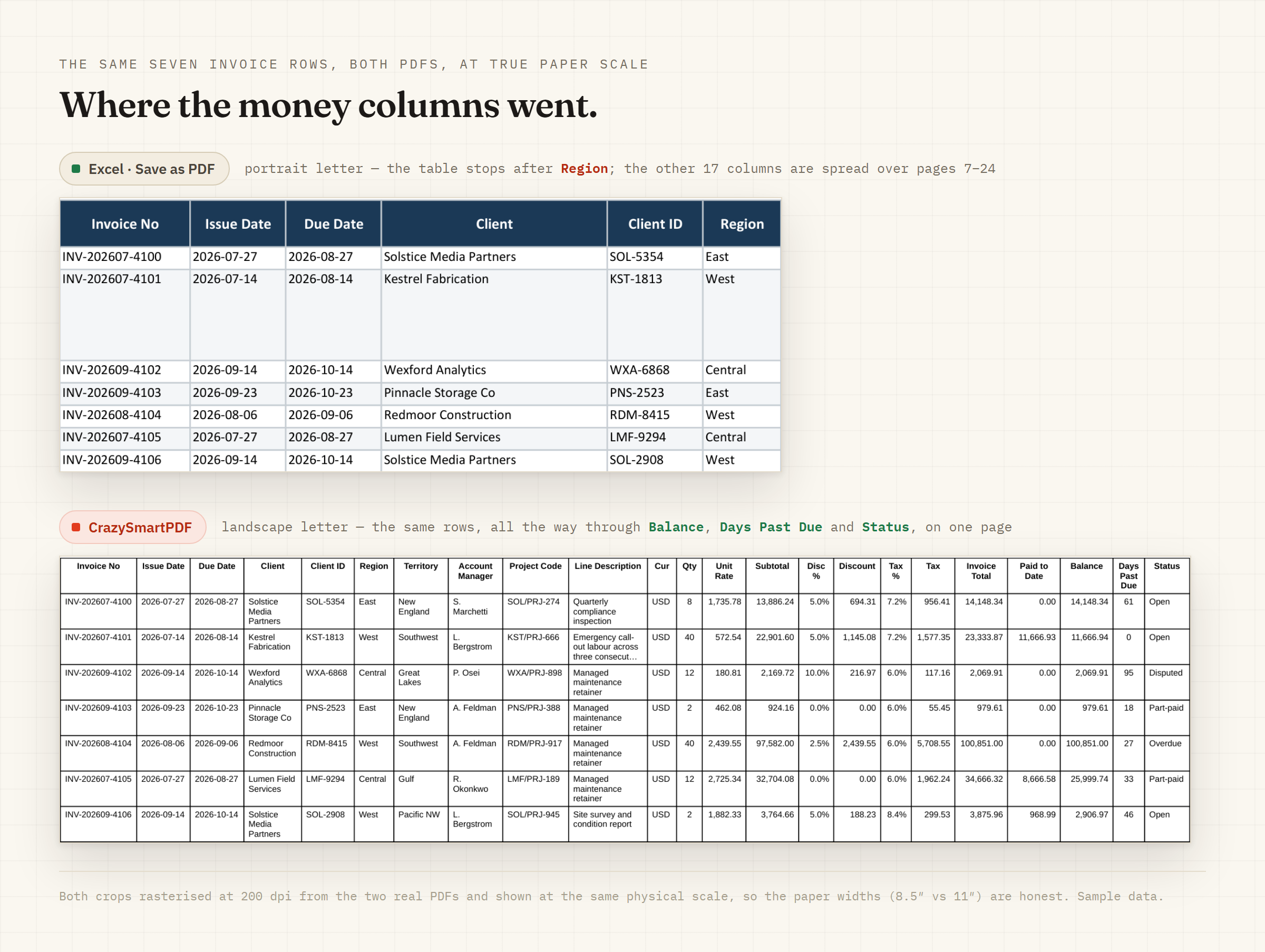
0.0%, and the two renderers break the .5 tie in opposite directions — same number, different last digit. If your output has to match Excel's display digit-for-digit, that is worth knowing.Sample workbook: 23 columns × 210 rows, synthetic — every company, person, invoice number and figure was invented for the capture. No customer data. The Tax % difference was checked against the workbook's raw cell value and both finished PDFs. Tap the image to open it full size.How CrazySmartPDF handles it
It doesn’t scale the sheet to fit a page — it re-lays-out at a readable font and paginates:
- A long sheet is spread across as many pages as it needs; a row is never split across a page break, and the detected header row repeats at the top of each page.
- When a sheet is too wide, it shrinks the font only to a readable floor and keeps words from breaking mid-token. Past that floor it slices the table into parts rather than shrinking to nothing — so you never get the “fit to one page” postage-stamp effect.
The honest caveats
The full native render runs on Windows and needs Excel installed (2016+) — no Mac build. The free web converter on the home page runs the same smart engine on our server — your file is converted, then deleted (never stored) — it reads your data and lays it out row-atomic at a readable size, never shrinking to fit. One place text is deliberately trimmed: a very long single-cell value — a paragraph-length memo, say — is clamped to a few lines with an ellipsis (…) to protect the row height. It won’t reflow an essay inside one cell; it protects the layout of the rows around it.