
Blog
Why online Excel-to-PDF converters cannot fix your layout
An upload converter's job is to reproduce your file faithfully — including faithfully reproducing the broken page setup you sent it. Fixing layout means re-computing it, which is a different kind of engine.
Short answer: Switching from one online converter to another almost never changes the result, and that is by design rather than by incompetence. An upload converter’s contract with you is fidelity: take this file, reproduce it, hand it back. If the file’s page setup slices a row across a page break, a faithful render slices it too. Fixing the layout would mean overruling what you sent — a different job, done by a different kind of engine.
Fidelity is the product
Read what the big converters actually promise and the pattern is consistent: your formatting carries over exactly as it is. That is a real promise and a good one. Nobody wants a converter that decides your header should be bigger.
But “exactly as it is” includes the parts you never chose. Your workbook has a page setup whether or not anyone set it: a paper size inherited from a printer driver, a scaling option somebody ticked in 2019, a print area from when the report had twelve columns, page breaks left over from a version that had different row heights. A faithful renderer reproduces all of that.
So the sequence is familiar. The PDF comes back with the last four columns missing. You try a different converter. Same result. You try a third, decide they are all bad, and go back to doing it by hand. The converters were doing exactly what they said they would.
What “as-is” looks like
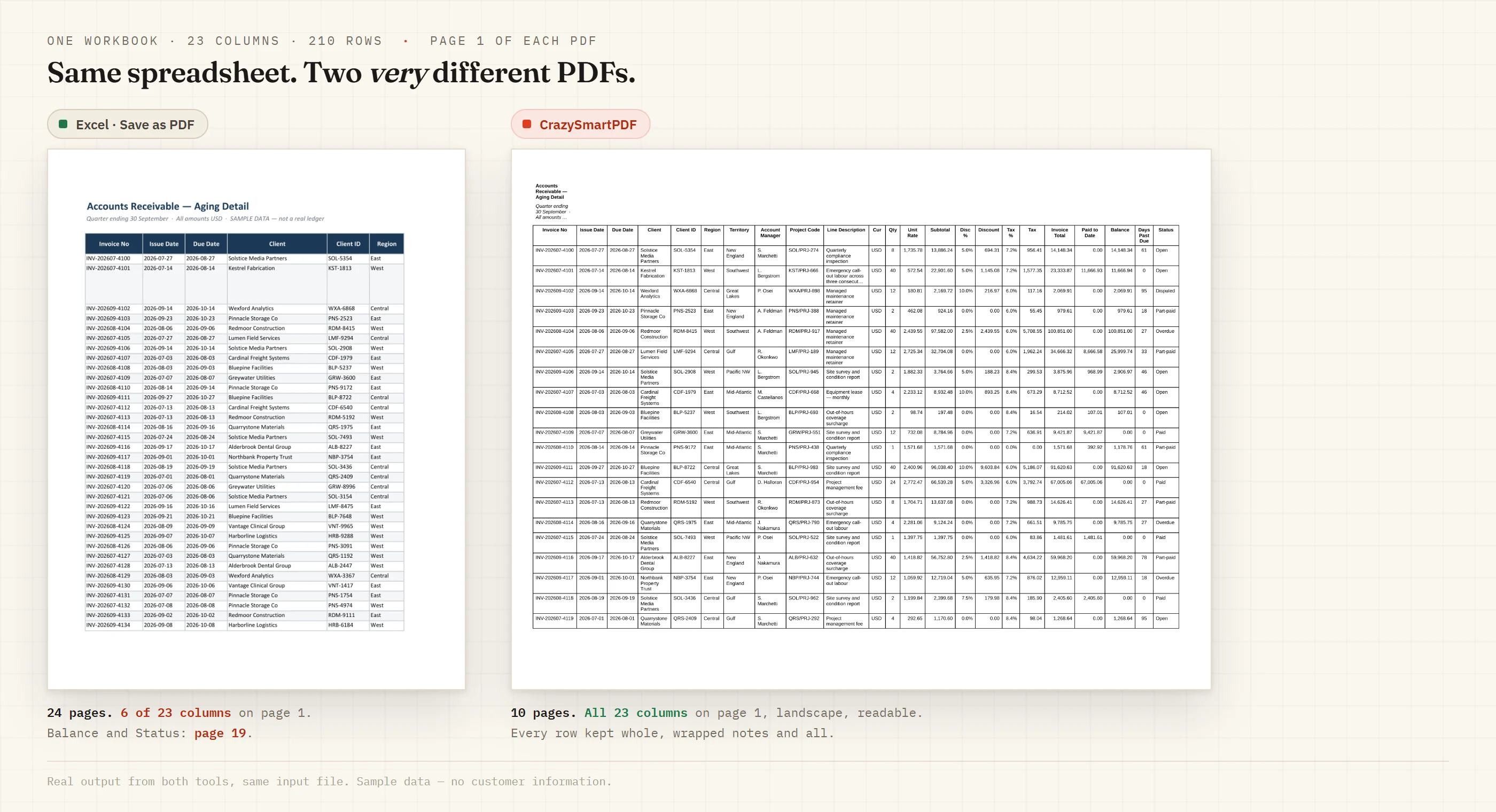
Both halves came from the same twenty-three-column workbook. The left is what an as-is render produces — in this case Excel’s own exporter, which is the same faithful-render design an upload converter follows: portrait, six columns on page 1, twenty-four pages, and the money columns printed on a separate strip of pages further back. The right is the same file with the pagination re-computed: landscape, all twenty-three columns, every row whole, ten pages. Sample workbook is synthetic — every company, person and figure in it was invented for the capture — and both page counts were read back out of the real PDFs.
What re-computing the layout means
A layout pass throws away the page setup as an instruction and treats it as, at most, a hint. It asks different questions:
- How wide is each column, really? Not the width somebody dragged it to, but the width its content needs.
- What shape is this sheet? Wide and short means landscape, regardless of what the page setup says.
- Where can a page end? At a row boundary, not through one, because half a row is not information.
- What if it still does not fit? Then slice the table across pages at a size people can read, repeating the label column on each slice, rather than shrinking everything until the numbers are decorative.
That is not a better renderer. It is a different step, performed before rendering, and no amount of upload bandwidth substitutes for it.
Why most converters do not do it
Because it is a hard thing to be wrong about in public. A converter that re-lays-out your sheet is making decisions on your behalf, and if it makes the wrong one you notice immediately. Faithful reproduction is defensible: whatever came out, that is what you sent. Re-computation has to be right.
It also needs to understand spreadsheets specifically rather than documents generally. A generic PDF suite converting Word, images, PowerPoint and Excel through one pipeline has no place to put “keep this row whole” — the concept does not exist for the other formats.
What this changes for you
If your exports are already clean, an online converter is fine and the free ones are genuinely useful. Use one.
If the same thing keeps breaking, stop switching converters. Either fix the page setup properly — landscape, fit-to-width, print titles, a print area that matches today’s data — or use a tool whose job is deciding the layout rather than reproducing it. Both are real answers. Trying a fourth upload site is not.
CrazySmartPDF re-lays-out each sheet before rendering: rows kept whole, wide tables kept readable rather than clipped, and a flag on any page that still came out blank or clipped. The free web tool does it for a single file in any browser — it uploads, converts and deletes the file — and the offline apps, with the whole-folder batch, need Windows with Excel 2016+. See how it works.